26/01/2016

How to Build Traffic in a Crowded Blogosphere – Free Guide


How to Build Traffic in a Crowded Blogosphere – Free Guide

Link to 2 Create a Website Blog

Posted: 25 Jan 2016 10:21 AM PST
How to Get Traffic in a Crowded Blogosphere - Free Guide!
People often perceive traffic building as a one-size-fits-all process that everyone can follow and receive similar results.
Sure, there are basic principles and guidelines you can follow such as…
  • write great content
  • develop social media strategies
  • start a YouTube Channel
But at the end of the day, traffic building is typically a unique journey for every person.
Here’s why…
  1. There are so many different platforms to market your site on
  2. Not every method works as well for every site/niche
  3. Everyone has a different skill set, work ethic, motivation, etc.
Building traffic is work, but you can simplify the process in the beginning if you use this simple strategy…
Choose one platform that aligns with your strengths and is occupied by your target audience. Stay committed to mastering that one area, and don’t feel that you have to master every platform.
You can read more about this and other tips in this free guide (with a cheat sheet) that will put traffic building into perspective and keep you from feeling overwhelmed.
It’s perfect for those who need a little motivation and guidance.
The Keep It Real Guide to Building Traffic in a Crowded Blogosphere
View the PDF or download the ZIP file to your computer.
Be sure to download it ASAP because in the near future, I will be requiring an opt-in to get it.

29/12/2015

9 WordPress Tricks You’re Probably Not Using But Should

9 WordPress Tricks You’re Probably Not Using But Should

Link to 2 Create a Website Blog

9 WordPress Tricks You’re Probably Not Using But Should

Posted: 28 Dec 2015 08:41 AM PST

9 WordPress Tricks You Aren't Using But Should

Not only is this a quick & easy read, but I guarantee you’ll discover at least one trick that you’ll want to implement on your WordPress site.

Insert a Link Shortcut

Press Control K to insert a link in WordPress

Geez. How did I miss this shortcut for so long?

The next time you add a link to a post or a page, highlight the text and hit Control – K (Command K on Macs) and the “Insert Link” box will appear like magic.

Bam! :-)

Highlight Your Recent Content With a “What’s New” Tab

Great Way to Highlight Recent WordPress Content

I’m often asked how I setup the “What’s New” tab at the top of my site.

I created this menu item on my navigation to highlight new content since I use my homepage for introductory content that leads to more subscribers and course income.

First create a new category and call it “New” or whatever you’d like.

Be sure to tag all your posts with this category so they’ll automatically show up there.

Then add this to category to your main menu using the Menu editor on WordPress.

How to Add Your Category to Your Menu

Customize The Top of Your Category Pages

How to Customize Your Category Pages

This tip goes along with the previous one. If you click on my “What’s New” tab, you’ll notice a gray box at the top of the page that encourages people to join my email list.

Subscribe Box

I created this promotional box by editing the top of my category page.

If you have a StudioPress theme (affiliate link), this is as easy as clicking on your category and then “Edit Category” from your WordPress dashboard bar that appears when you are logged in.

Edit Category

Once you click “Edit Category”, scroll down to the boxes titled “Archive Headline” and “Archive Intro Text.” This is where you enter your text.

Good news! HTML code is allowed here. :-)

Edit Category Pages

If you don’t have a StudioPress theme, this article will guide you.

Change Your Default Post Category

How to Change Your Default Category in WordPress

Because all my posts go into the “New” category (as explained above) I thought it would be convenient to set that category as my Post default.

After all, who wants “Uncategorized” as the default? Not me!

You can easily set your default category to whatever you’d like by going to Settings > Writing.

Change Category Default

I was so happy to discover this because I would always forget to change the default Uncategorized category when creating a new post. Problem solved!

How to Display a Code Box

How to Display Code in a Box with WordPress

Ever wonder how people created those boxes of code for their readers to copy and paste like this?

<title>Your HTML Title Goes Here</title>  <meta name="description" content="Insert Your Meta Description">   

Wonder no more!

Install the SyntaxHighlighter Evolved plugin. There are different styles and settings so you can customize the display.

Roll Back Your Plugins

How to Roll Back Your Plugins

I’ve needed this so often in my blogging life.

Have you ever updated a plugin and something broke or you preferred the previous version?

Install WP Rollback and you can revert any plugin back to a previous edition. You can also roll forward.

Reverse Your Comments From Newest to Oldest

How to Reverse Your Comment Order in WordPress

This tip may seem incredibly basic, but have you considered this? …

Showing the oldest comments first (the WordPress default) could actually discourage additional comments.

Say you have an old page or post on your site that still gets a lot of traffic.

If your oldest comments are listed first, it may look as if no one is discussing the topic anymore — especially if your comments are broken up into multiple pages.

However, showing the more recent comments first, will highlight the newer ones, and encourage the discussion to continue.

I made the switch a while back because many articles on my hair site are a few years old, but still get a lot of comments thanks to getting found in Google.

A woman commented on an article and wrote that she was replying even though the discussion is old, but there were actually 10 replies made in the last couple of months.

Because I had the oldest comments first and the new ones were on another page, she missed the latest ones altogether and thought no one was discussing the topic anymore.

Lesson learned. Now I always display newest comments first on my blogs.

You can do this easily by going to Settings >> Discussion and checking the box that says “comments should be displayed with the newer comments at the top of page.”

Display comments newest to oldest

The other option is to remove dates from comments altogether. I’ve noticed a lot of bloggers do this now.

Change Your Optimal Image Sizes

How to Change Default Image Sizes

We all tend to have our image size preferences, but did you know that you can tell WordPress what they are and overwrite the defaults?

Go to Settings >> Media to update to set the defaults for thumbnails, large and medium images.

The next time you add images to your content, these sizes will be the default.

Sweet!

Speed Up Your Sluggish Blog by Killing Bloated Plugins

Discover & Kill Bloated WordPress Plugins

Slow-loading pages are not only a pain for your readers, but it can negatively impact your search engine rankings.

Yes, page speed is one of Google’s 8.7 million page ranking factors.  ðŸ˜‰

But wouldn’t you like to know exactly what’s causing the lag?

Install the Plugin Performance Profiler plugin to find out what plugin is taking up the most resources. Just make sure you delete it after you find the culprit. It’s a resource hog.

Kind of ironic, eh? :-)

Sure, some “bloated” plugins like “Related Posts” (plugins that scan your entire site) are hard to get rid of because they are useful. I just keep these to a minimum.

In fact, I try to keep my active plugin totals around 20 for optimal loading and to minimize security risks.

Also remember not all plugins need to be active at all times. For example, WP Rollback can be deactivated until you are ready to update your plugins.

That’s all folks! Hope you learned something new that you can use.

Hope you’re enjoying your Holiday. :-)

16/12/2015

Why I’m Not on Periscope – Are You?

Why I’m Not on Periscope – Are You?

Link to 2 Create a Website Blog

Why I’m Not on Periscope – Are You?

Posted: 15 Dec 2015 09:13 AM PST

Why I'm Not on Periscope

Periscope is smoking hot right now!

Bloggers and marketers are singing the praises of the budding app, and I’ve been asked why I haven’t started live broadcasting.

After all, I’ve had some success with YouTube, so wouldn’t this live streaming video app be the next logical step for me?

What’s the deal?

The truth is, I actually LOVE Periscope as a viewer, but haven’t done any broadcasts. I made a vow to myself when it comes to jumping on “the next big thing” online.

You’ll have to listen to the podcast below (Feedburner email subscribers click here) to find out why I haven’t scoped, and how I will track the success (or lack thereof) when I do in 2016.

Not into podcasts? No worries. I’ve got the transcript for ya right here. You can also download the mp3 (right-click and choose “Save As”) and listen later.

So tell me. Are YOU on Periscope?

If so, what specifically are you doing, and how is it helping your bottom line? Be sure to leave your name and strategy below so I can follow you!

I’m really interested in following “scopers” who are using a consistent and trackable strategy. Also feel free to share names of people you enjoy following.

Happy Holidays!

In This Episode

  • What is Periscope?
  • Why I’m not using it yet
  • What I like and dislike about it
  • Why I disagree about it being hard to monetize
  • How I plan to use it for promotion and track conversions in 2016

24/11/2015

How Your SEO Plugin Can Deceive You

How Your SEO Plugin Can Deceive You

Link to 2 Create a Website Blog

How Your SEO Plugin Can Deceive You

Posted: 23 Nov 2015 08:41 AM PST

Do Meta Tags Matter in SEO?

I’m continuing with my theme of responding to your emails about your biggest site issues.

A handful of you mentioned that you are struggling with ranking and optimizing your pages (specifically meta tags and understanding how on-page factors influence your rank).

Meta tags are descriptors within your page’s code. The search engines read them and also display them in the results.

Some of you use plugins like Yoast or All in One SEO, and they let you manually enter data for these tags. Or if you have a StudioPress theme (affiliate link) like me, the fields are built into the WordPress editor.

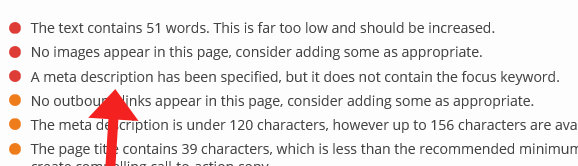
Yoast has a Content Analyzer that encourages you to optimize your meta title, description and other on-page factors.

Yoast SEO Plugin

I must say. Even though I don’t use an SEO plugin, I do think there are helpful aspects of Yoast, and they keep the plugin up-to-date.

But I’ve also noticed many assume meta tags carry more weight than they actually do. I’ve known people to completely stress themselves out over what to enter in those Yoast fields.

You should review Google’s guide that explains how they use the data.

Where The Value Really Lies

If you’d rather watch the video version, see below. If not, continue reading.

If you didn’t get the memo, high quality links are what drive the top 10 results now.

So if you are trying to rank for a competitive keyword, it doesn’t matter what you put inside those meta tags, you need strong links pointing to your site. And don’t forget about internal page linking too.

Now, if it’s a less competitive phrase, then the content on the page and meta tags play more of a role.

But once your content is actually ranking, you can use your meta title and description to get more clicks by making them more engaging. That’s where the real value lies.

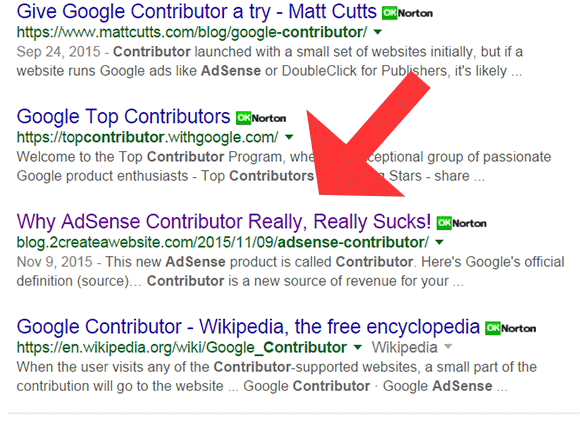
Remember my last post about AdSense Contributor? (By the way, that’s an example of an internal. People often forget to link their pages internally.)

Well here’s how the post looks in the results as of November 23rd.

AdSense Contributor

Are the meta tags helping me rank?

The meta title helps, but largely because I targeted a keyword with low competition.

While I’d love for you to think I’m an SEO Goddess and I can rank for anything I want, no doubt the lack of competition helps. :-)

Also, I don’t even have a meta description. No real reason other than the fact I just forgot to add one. I do this a lot.

But notice the title above.

I wanted to write something that really stands out so if it does rank, it will give people a reason to click.

To me, that’s the real value of meta tags today.

It’s not just about entering your target keywords. Type something interesting to get people’s attention.

Ten years ago, I would put more emphasis on the keywords I insert. Now I look at them more as an assistant for getting clicks once/if the page ranks well.

Yes, they still have value (except for the Keyword tag and engines admit they ignore it), but I personally feel the title and description are more helpful AFTER your site ranks.

And be careful of stuffing too many of the same keywords into these tags. This can actually cause a penalty if you overdo it.

Speaking of stuffing, have a Happy Thanksgiving! Sorry, couldn’t resist. :-)